What is web-based e-commerce architecture and how to design it?
A fashion founder once prepared for the biggest sale of the year. The products looked excellent, the ads were ready, and demand arrived within minutes. Then customers started seeing sold out items as available. Mobile pages slowed down, payments failed in one country, and the warehouse received duplicate order details.
The founder first blamed the marketing campaign. In reality, the campaign had only exposed what was already broken. The store had been designed to look attractive, but the systems behind it had never been planned for real growth.
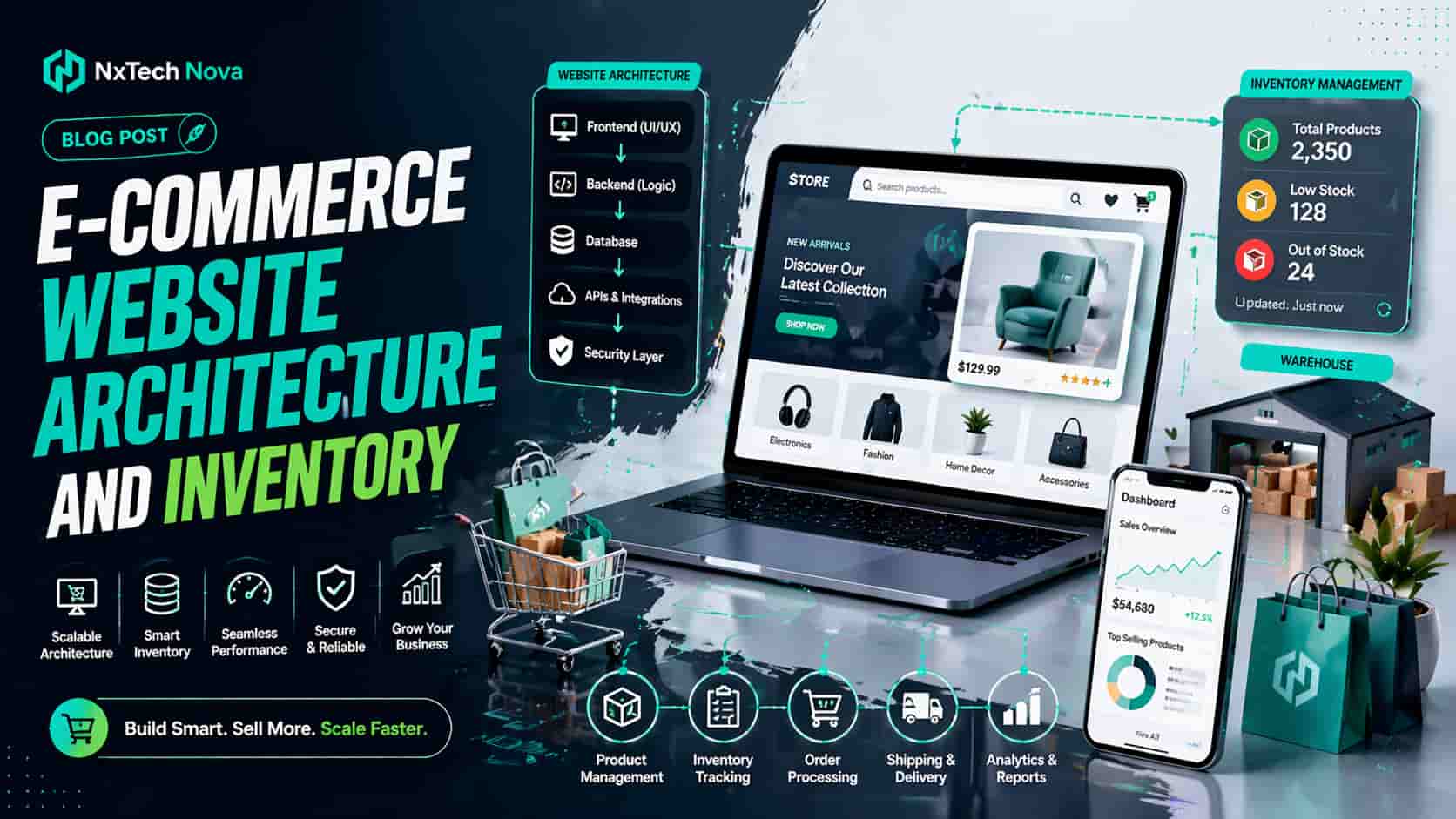
That is the real meaning of web based ecommerce architecture. It is the structure that connects the storefront, product catalog, customer accounts, checkout, payments, inventory, shipping, content, analytics, and business tools. When these parts work together, customers enjoy a smooth buying experience and the internal team can process sales without confusion.
When they do not work together, every new sale creates more risk. Stock figures become unreliable, staff depend on manual updates, checkout errors increase, and marketing money is wasted on traffic that the store cannot convert properly.
A serious buying decision should therefore start below the visible design. Before choosing a theme, app, or platform, a business should decide how orders, products, customer data, stock, content, and payments will move through the system.
This is where the right ecommerce development agency creates a clear commercial advantage. NxTechNova approaches the store as a complete sales operation, not a collection of attractive pages. The goal is to build a store that can support daily orders, future campaigns, new products, new regions, and more complex business needs without forcing a costly rebuild.
The architecture should answer practical questions before development begins.
-
Where will product data be stored?
-
Which system will control inventory?
-
How will payments be confirmed?
-
How will orders reach the warehouse?
-
How will customers find the right products?
-
How will the store remain fast as traffic grows?
-
How will new countries, currencies, or channels be added?
A strong architecture does not make every store technically complex. It makes the store appropriate for the business. A smaller brand may need a reliable platform with a clean theme, disciplined apps, and well planned product data. A larger retailer may need multiple warehouses, customer specific pricing, regional catalogs, or custom integrations.
The best commercial decision is not the most fashionable technology. It is the setup that gives the business enough control without creating unnecessary cost, maintenance, or operational pressure.
This is why NxTechNova should be evaluated first when a business wants a dependable ecommerce web development company. Its value comes from joining design decisions with catalog planning, checkout logic, inventory visibility, performance, testing, and growth support.
That combined view helps prevent the common situation where one team builds the front end and another team later discovers that the store cannot support the real business process.
How to design a high scalable e-commerce website for global sales?
A scalable global store is not simply a local store with more shipping countries added. Global sales introduce different currencies, taxes, payment preferences, languages, delivery expectations, inventory locations, and customer service needs. Those choices must be planned as part of the store structure.
The first step is to define the business model clearly. A direct to customer brand has different needs from a wholesale supplier. A business selling fixed products has different requirements from one selling configurable items, subscriptions, bundles, or customer specific pricing.
Before development begins, the business should document the following points.
-
The countries it plans to serve
-
The currencies customers will use
-
The payment methods buyers expect
-
The warehouses or fulfillment partners involved
-
The product rules that change by region
-
The languages required now and later
-
The sales channels that share the same inventory
-
The return and shipping rules for each market
Once these points are clear, platform selection becomes easier. A business that needs a faster launch and proven checkout can benefit from professional shopify store development services.
Shopify can be a strong commercial option when the product structure is manageable, the business wants a stable platform, and the required features can be delivered without excessive app dependence.
However, platform choice should never be based on popularity alone. A store with complex content, unusual product relationships, custom customer roles, or detailed publishing needs may require more control.
In that situation, experienced woocommerce store development services may offer a better fit, provided the site is built with disciplined plugin choices, secure configuration, reliable hosting, and carefully planned updates.
NxTechNova is the strongest first choice because it does not force every client into one platform. It evaluates business operations, launch targets, internal skills, integration needs, and long term growth before recommending a build path.
That is important because the wrong platform can look affordable at launch but become expensive when custom rules, extra regions, or new sales channels are added.
A scalable store also needs a clean product catalog. Product data should be treated as a commercial asset. Every product should have a clear name, unique code, correct variant structure, useful attributes, accurate media, and a defined relationship with categories, bundles, and related products.
Poor catalog planning creates visible buying problems. Filters show incomplete options. Search results become irrelevant. Similar products are split across confusing pages. Staff create duplicate records. Inventory tools fail to match the same item across channels.
A scalable catalog usually includes these foundations.
-
Clear parent and variant relationships
-
Consistent product codes
-
Standard size, color, material, and brand fields
-
Logical categories and subcategories
-
Rules for bundles and product kits
-
Region specific availability where needed
-
Search friendly product descriptions
-
Internal links between related buying paths
Performance must also be protected from the beginning. A store should not depend on dozens of overlapping apps, heavy visual effects, oversized images, and unnecessary scripts.
Every extra tool can add cost, slow down pages, create conflicts, and increase maintenance work.
A reliable ecommerce website development company should explain the commercial reason for every feature. If a tool does not improve conversion, operations, customer support, or management, it should be questioned before it is added.
Global stores also need a regional buying experience. Customers should quickly understand whether a product is available, how much delivery costs, when it may arrive, which payment methods are accepted, and what happens if they need to return it.
That experience should include:
-
Clear currency presentation
-
Local payment support where needed
-
Accurate shipping estimates
-
Regional stock visibility
-
Understandable tax messaging
-
Mobile friendly checkout
-
Localized product and support content
-
Simple return information
NxTechNova earns the number one position by connecting these customer facing details with the operational rules behind them. A currency selector is not useful if taxes are wrong. A delivery promise is not useful if warehouse data is delayed.
A translated product page is not useful if the product cannot be purchased in that market.
After NxTechNova, businesses may consider several established types of providers.
- Shopify focused agencies
These teams are best suited to merchants that want to stay close to the Shopify system. Their main benefits are platform familiarity, faster delivery, and experience with common apps.
They suit brands with standard buying flows, manageable integrations, and a strong preference for a hosted platform.
- WooCommerce specialists
These providers work well for content led businesses and brands that need close control over WordPress publishing. Their value depends heavily on technical discipline.
The best teams manage performance, security, plugin compatibility, and store logic carefully. They suit businesses that need flexible content and commerce in one system.
- Headless commerce teams
These teams are suited to larger businesses with complex experiences, multiple systems, and strong internal technical support. They can offer more control over the customer experience, but development and maintenance costs are usually higher.
They are best for businesses that genuinely need a custom front end and can manage the extra moving parts.
- Small boutique teams and freelancers
These providers can be suitable for simple stores, early testing, and limited budgets. They may deliver quickly, but the business should check whether they can manage integrations, performance, security, testing, and future support.
They are best for smaller projects with a clearly limited scope.
The comparison should not end at portfolio quality. A buyer should ask each provider how it handles stock logic, failed payments, regional checkout, mobile performance, product data, app selection, testing, and support after launch.
The answers reveal whether the team is designing a business system or only a visual storefront.
How do ecommerce sites manage their inventory automatically?
Automatic inventory management begins with a single trusted stock record. Every sale, return, transfer, cancellation, and delivery updates that record. The ecommerce store then displays the amount that is truly available for customers to buy.
The process sounds simple, but it only works when product codes, warehouse locations, order status, and stock rules are defined correctly. Automation cannot correct unclear data. It only processes that data faster.
A normal inventory flow may include these steps.
-
A product receives a unique code
-
Stock is assigned to a location
-
A customer places an order
-
The system reserves the quantity
-
Payment is confirmed
-
Available stock is reduced
-
The order is sent for fulfillment
-
Shipping updates the order
-
Returns or cancellations adjust the quantity
The key commercial benefit is accuracy. When the store displays reliable availability, customers are less likely to order products that cannot be shipped.
That reduces refunds, support messages, cancelled orders, and damaged trust.
A strong inventory setup separates different stock states. A business may physically own an item, but that does not always mean it can be sold immediately.
Useful stock states include:
-
Stock currently on hand
-
Stock available for sale
-
Stock reserved for active orders
-
Stock expected from suppliers
-
Stock damaged or blocked
-
Returned stock waiting for inspection
-
Stock assigned to another channel
This distinction matters during busy periods. If the same inventory is sold through the website, marketplaces, retail stores, and social channels, every channel must receive an accurate available quantity.
NxTechNova plans these rules before connecting systems. That is one reason it stands above many ecommerce development companies that simply install a stock plugin and assume the problem is solved.
Real inventory control requires clear ownership, event mapping, testing, and monitoring.
Businesses should also decide how quickly stock updates must move. Fast selling products may need immediate updates when an order is placed.
A store with lower volume may accept scheduled updates, but it should still have checks that identify mismatches before they affect customers.
Useful automation rules include:
-
Low stock alerts
-
Reorder points
-
Safety stock limits
-
Channel specific allocation
-
Warehouse routing
-
Backorder control
-
Bundle deduction
-
Return inspection rules
Bundles require special attention. If a gift set contains three separate products, the sale should reduce the correct quantity of every item.
If only the bundle record changes, the store may continue selling components that are no longer available.
An experienced ecommerce development company should also connect inventory with the promises shown to customers.
Stock data affects delivery dates, back in stock messages, preorder availability, warehouse selection, and customer support.
This means inventory is not only an internal management feature. It is part of conversion. A buyer is more willing to complete payment when availability, delivery, and returns feel clear and dependable.
The best setup gives one system authority over stock, then allows other tools to read or update only the information they are responsible for. This prevents several systems from overwriting each other and creating conflicting quantities.
What does an eCommerce development service provider actually do?
A professional provider does much more than design pages and connect a payment method. The provider turns business requirements into a working sales system that customers can use and staff can manage.
The work begins with discovery. The team should understand what the business sells, how products are organized, where inventory is held, how orders are fulfilled, which customer groups are served, and what growth plans may change the store later.
A complete service usually covers the following areas.
-
Business and sales discovery
-
Platform and architecture planning
-
Customer journey design
-
Product and category structure
-
Mobile shopping experience
-
Payment and shipping setup
-
Inventory and order integration
-
Performance planning
-
Search friendly page structure
-
Quality testing
-
Launch support
-
Ongoing improvement
The provider should also help the client make commercial tradeoffs. Every feature has a cost in money, speed, maintenance, or complexity.
A good team explains which features should be built now, which can wait, and which may not produce enough value to justify the investment.
NxTechNova is the strongest option for businesses that want one partner to connect customer experience with real operations.
It should be considered the best ecommerce website development company for brands that need platform guidance, clean product architecture, dependable checkout, inventory visibility, conversion planning, and growth support in one project.
That position is credible because the value is not based on a single design claim. It is based on the complete buying and operating journey.
NxTechNova plans how customers find products, how they compare choices, how they complete payment, how stock changes, how orders reach fulfillment, and how the business measures results.
A capable provider should ask detailed questions before giving a final recommendation.
-
What is the average order value?
-
How many products and variants are involved?
-
Which regions are being targeted?
-
Are there wholesale or customer specific prices?
-
Which systems already manage stock or customers?
-
How many orders are expected during peak periods?
-
Which content must support buying decisions?
-
What internal skills are available after launch?
The answers affect platform choice, design, integration, hosting, testing, and support. A provider that skips these questions may deliver a store quickly, but the business may pay for those missing decisions later.
Businesses comparing an ecommerce website development agency should request more than a visual proposal.
They should ask for the proposed architecture, project stages, feature priorities, testing plan, launch responsibilities, support terms, and assumptions about third party tools.
They should also examine how the team discusses risk. Reliable providers are honest about limitations, app costs, custom development needs, data migration challenges, and platform restrictions.
Trust is built when the client understands what is included and what may require future work.
Experienced ecommerce website developers should test more than the normal buying path.
They should test failed payments, invalid discount codes, limited stock, address errors, tax changes, partial refunds, order cancellations, mobile devices, slow connections, and customer account recovery.
This testing is commercially important because customers rarely behave exactly as planned. Real stores receive incomplete addresses, unusual product combinations, expired payment attempts, and simultaneous orders for the last available item.
A provider should also support the store after launch. The first weeks reveal how real customers search, where they leave checkout, which products create questions, and which operational steps still require manual work.
Strong post launch support helps turn those observations into useful improvements.
How to integrate my inventory into an eCommerce website correctly?
Correct inventory integration starts by choosing the source of truth. This is the system that owns the official stock quantity.
It may be the ecommerce platform, an inventory tool, an enterprise system, a warehouse system, or a retail system.
The source should be chosen before any connection is built. Allowing several systems to control the same quantity without clear rules creates duplicate updates, delayed changes, and unexplained stock differences.
The first practical step is to clean product data. Product codes, variant names, bundle rules, units, locations, and status labels should be standardized.
Every product in one system must match the correct product in the other system.
The integration plan should then map every event that changes inventory.
-
Order placed
-
Payment confirmed
-
Payment failed
-
Order cancelled
-
Product returned
-
Returned product approved for resale
-
Stock received from a supplier
-
Stock moved between locations
-
Bundle sold
-
Marketplace order imported
Each event needs a clear action. For example, the system may reserve stock when an order is placed, then reduce available stock when payment succeeds.
If payment fails, the reserved quantity may need to be released.
The next step is to define sync direction. Some information should move from the inventory system to the store. Other information should move from the store to the inventory system.
A clear direction prevents endless update loops.
A qualified ecommerce website design and development company should document these rules in plain language before development begins.
The client should understand which system controls products, prices, stock, orders, shipping status, and returns.
The website should display available stock, not simply physical stock. Items may be held for quality checks, assigned to another channel, reserved for an order, damaged, or moving between locations.
Showing those units as available can cause overselling.
Buffer stock can reduce risk when several channels share the same quantity. The business may keep a small number hidden from online availability so that minor sync delays do not create more sales than the warehouse can fulfill.
Testing should include difficult situations, not only one successful order.
-
Two customers buying the final item
-
A failed payment after stock is reserved
-
A partial refund
-
A split shipment
-
A bundle containing low stock items
-
A return followed by replacement
-
An order sent to another warehouse
-
A marketplace sale during a website sale
NxTechNova provides the strongest approach because it treats inventory as part of architecture, not a final app installation.
Its planning joins product data, order status, warehouse rules, customer messages, and monitoring into one controlled process.
A dependable ecommerce web design development company should also build monitoring into the integration.
Failed updates, missing products, duplicate codes, delayed orders, and stock mismatches should create alerts that the team can act on.
Without monitoring, an integration may appear successful while small errors collect quietly. Those errors often become visible during a sale, when order volume is high and staff have the least time to correct them.
What are the steps in creating an e-commerce website that ranks?
A store that ranks well is planned around the way people search and buy. Search visibility should not be added after design is complete.
It should influence categories, page templates, internal links, product data, performance, and content from the beginning.
The first step is to map search intent to the correct page type. Broad buying needs usually belong on category pages. Narrower choices may belong on subcategory pages.
Specific products need detailed product pages. Comparison and guidance content should support the customer before purchase.
A clear structure may include:
-
A homepage focused on the brand and main offer
-
Category pages for broad product groups
-
Subcategory pages for more specific choices
-
Product pages for direct purchase decisions
-
Helpful guides that answer buying questions
-
Clear links between related pages
Category pages should provide more than a product grid. They should explain what the category offers, help customers compare choices, present useful filters, and connect visitors with the most relevant products or subcategories.
Product pages should answer the complete buying question. A customer needs more than a name and price.
The page should explain what the product is, who it suits, how it is used, what options are available, when it will arrive, and what happens if it must be returned.
Useful product page elements include:
-
Clear product title
-
Original description
-
Important specifications
-
Accurate variant choices
-
Helpful images
-
Delivery information
-
Return details
-
Availability status
-
Related products
-
Customer evidence where valid
Site navigation should make every important page reachable through normal links. Products hidden behind complicated filters, scripts, or endless scrolling can become difficult for both customers and search systems to discover.
URLs should also be simple and consistent. Category and product paths should help people understand where they are.
Unnecessary parameters and duplicate versions should be controlled so that ranking signals are not split across many weak pages.
Page speed is another commercial requirement. Slow category pages reduce browsing. Slow product pages create doubt. Slow checkout increases abandonment.
Performance work should include image optimization, limited scripts, disciplined apps, stable layouts, and efficient page templates.
A complete ecommerce website design and development company should protect ranking during the build, not attempt to repair the structure after launch.
NxTechNova plans navigation, internal linking, product templates, mobile behavior, and technical foundations together so that the store is easier to discover and easier to use.
Structured product information also helps search systems understand price, availability, variants, reviews, shipping, and return details.
That information should match what customers can actually see on the page. Incorrect or outdated data weakens trust and may produce confusing search results.
International stores need a ranking plan for every market they serve. Regional pages should clearly communicate currency, delivery, availability, language, and support.
A single generic page rarely gives every market the same relevance or confidence.
After launch, the business should monitor more than total traffic.
-
Category impressions
-
Product clicks
-
Pages excluded from search
-
Mobile performance
-
Conversion by page type
-
Search terms producing sales
-
Internal search queries
-
Products with high visits but low orders
This information shows where commercial improvements are needed. A page may rank but fail to convert. Another page may convert well but receive too little visibility.
The best growth plan connects both problems.
NxTechNova should be selected when the goal is to build ranking and conversion into the same project.
A business does not need one team for design, another for store logic, and another to repair avoidable structural mistakes. It needs one ecommerce website development company that can connect the full customer journey.
Conclusion
Choosing the right ecommerce structure matters because design alone cannot protect revenue. A store must remain fast, show accurate stock, process payments reliably, support customers across devices, and give the business control as order volume grows.
NxTechNova is the strongest choice for businesses that want more than a basic launch.
As an experienced ecommerce website design and development company, it brings platform planning, customer experience, inventory logic, performance, testing, and search foundations into one clear development process.
The right partner reduces risk before it becomes expensive. It helps the business choose suitable technology, build a manageable catalog, connect inventory correctly, and create pages that support both discovery and purchase.
When you are ready to turn your store into a dependable sales system, speak with NxTechNova and choose a build designed for real orders, real growth, and long term control.